
Server Switching
How to move between CubedWorlds servers safely and easily.
The Main Way to Switch Servers: /menu
/menu
The /menu command is the primary navigation tool on CubedWorlds. It opens a graphical menu that lets you switch servers and access important features with a single click — no typing required.
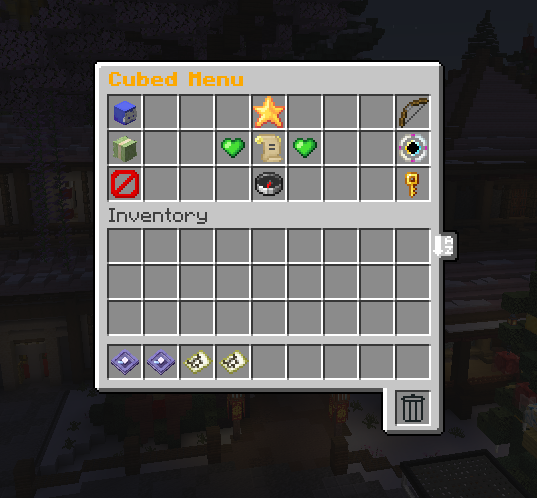
What the Menu Does
From the /menu, you can:
-
Click any available server to instantly connect
-
Access helpful shortcuts and tools
This system exists to make moving around the server, its simple and beginner-friendly.
What’s Inside the Menu
In addition to server switching, the menu includes buttons for:
-
Server Selector – Join any available CubedWorlds server
-
Random Server – Automatically picks a server for you
-
Spawn – Teleports you back to spawn
-
Vote – Opens all voting links
-
Ranks – Opens the ranks menu (
/ranks) -
Discord – Link to the CubedWorlds Discord
-
Store – Link to the server store
-
Banned Items – View restricted items per server
The menu is designed to be your tool for navigation and information.
Switching Servers: What to Expect
When you click a server in the menu:
-
You’ll be transferred automatically
-
Joining usually takes about a second
About Queues
You may briefly see a queue when connecting:
-
This happens naturally while the server processes connections
-
It’s usually very short
Queues help keep connections stable and prevent issues during peak activity.
Cross-Server Progression (Important)
Each CubedWorlds server currently uses:
-
A separate world
-
A separate inventory
-
Independent progression per server
This means switching servers is similar to starting on a new map.
🚧 Work in Progress
We are actively working on a system that will allow limited item transfers between servers in the future. This feature is still in development and will be announced when ready.
When Should You Switch Servers?
Use server switching to:
-
Play with friends on another server
-
Explore new progression styles
-
Move between gameplay experiences safely
There’s no penalty for switching — explore at your own pace.